
Mobile App Developer · Android & Flutter
Iris 1.9.0 is out. One change only. A ring for typing speed.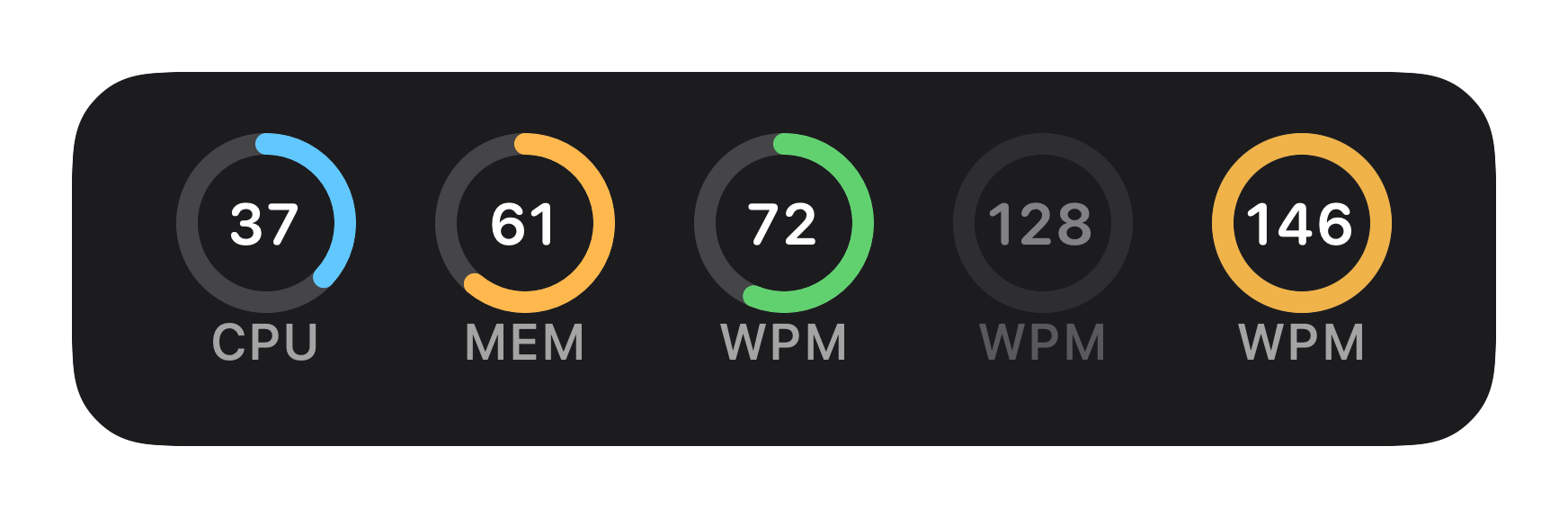
While you type, the number in the ring is words per minute. It only looks at the last five seconds. The math is simple: keystrokes divided by five, scaled to a minute. So the number moves fast.
Stop for about two seconds and it switches to your personal best. The arc empties. The whole ring fades. The label underneath always says "WPM".
And while you're typing, the arc is your current speed against that best. Match it or beat it, and the arc turns amber.
But a best only counts after five seconds of unbroken typing. A short burst can't set a record. The record sticks around, too. Quit the app and it's still there.
Just a number. Iris reads the system's running count of key presses. It never sees which keys you pressed. And nothing leaves the Mac. Holding a key down counts once.
You have to turn it on: Settings → Content → Typing, then "Show typing-speed tile".
Iris.dmg from the release page. Signed with a Developer ID and notarized by Apple.The last release was 1.8.5, back in September. For what Iris is and what else it does, see its page. Got thoughts? Open an issue on GitHub.